

Field service automation replaces the manual workflows that cost trades businesses hours every week: paper work orders, phone-tag dispatching, handwritten invoices, and disconnected accounting. The global field service management market is projected to grow from $6.2 billion in 2026 to over $23 billion by 2035, and trades contractors are driving a significant share of that growth. This guide breaks down exactly which systems to automate, how they connect, and what kind of ROI to expect.
If you're a trades business owner exploring custom automation tools built around your specific workflows, get a free quote to see how a tailored solution compares to off-the-shelf software.
What Field Service Automation Means for Trades Businesses in 2026
Field service automation is the use of software to handle recurring operational tasks, including scheduling, dispatching, work order management, invoicing, and customer communication, without manual input at every step. For HVAC contractors, plumbers, electricians, and general trades operators, this means replacing clipboard-and-phone workflows with connected digital systems.
The distinction matters for trades businesses specifically because most off-the-shelf FSM platforms are built for enterprise service organizations with hundreds of technicians. Trades contractors with 5 to 50 crew members need automation that fits their scale: fast to set up, affordable, and integrated with the accounting tools they already use. This is the kind of operational challenge that custom software development is built to solve.
According to Fortune Business Insights, the FSM market is growing at a 10.7% CAGR through 2034, with mobile field service solutions and cloud-based platforms driving adoption among smaller operators. Schedule, dispatch, and route optimization alone account for over 28% of market share, worth more than $1.6 billion in 2026. That tells you where the biggest efficiency gains are hiding.

Suboptimal field operations cost the U.S. trades industry an estimated $177.5 billion per year, with paper-based processes and manual scheduling accounting for a significant share of that waste.
Five Core Systems Every Trades Business Should Automate
Field service automation is not a single tool. It is a stack of connected systems that handle different parts of your operation. Here is what that stack looks like for a typical trades business:
System | What It Automates | Business Impact |
|---|---|---|
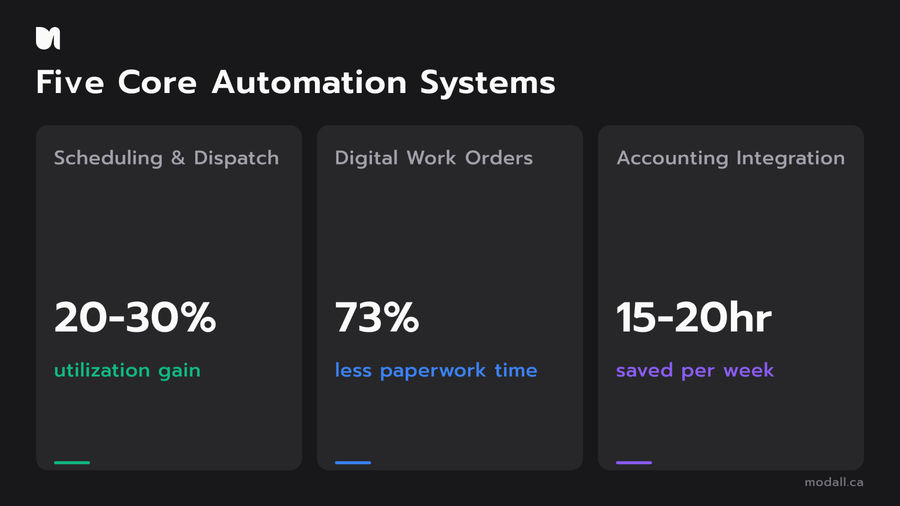
Scheduling and Dispatch | Job assignment, route optimization, crew availability | 20-30% improvement in technician utilization |
Mobile Forms and Work Orders | Digital job documentation, photo capture, signature collection | Eliminates paper rework, reduces admin time |
Invoicing and Payments | Automated invoice generation, payment processing | Faster billing cycles, fewer errors |
Customer Portal | Self-service booking, job status tracking, communication | Reduced inbound calls, better customer experience |
Accounting Integration | QuickBooks/Xero sync, real-time financial data | Saves 15-20 hours/week on manual data entry |
The power of field service automation software comes from connecting these five systems so data flows from one to the next without anyone re-entering it. A technician completes a digital work order on their phone, the invoice generates automatically, the payment processes, and QuickBooks updates, all without the office touching it.
How Scheduling and Dispatch Automation Changes Your Day
Automated scheduling and dispatch is the single highest-impact investment for trades businesses. It is also the area where manual processes create the most waste.
Traditional dispatch relies on a coordinator juggling phone calls, whiteboards, or spreadsheets to assign the right technician to the right job. That process breaks down fast when cancellations happen, emergency calls come in, or crew availability changes mid-day.
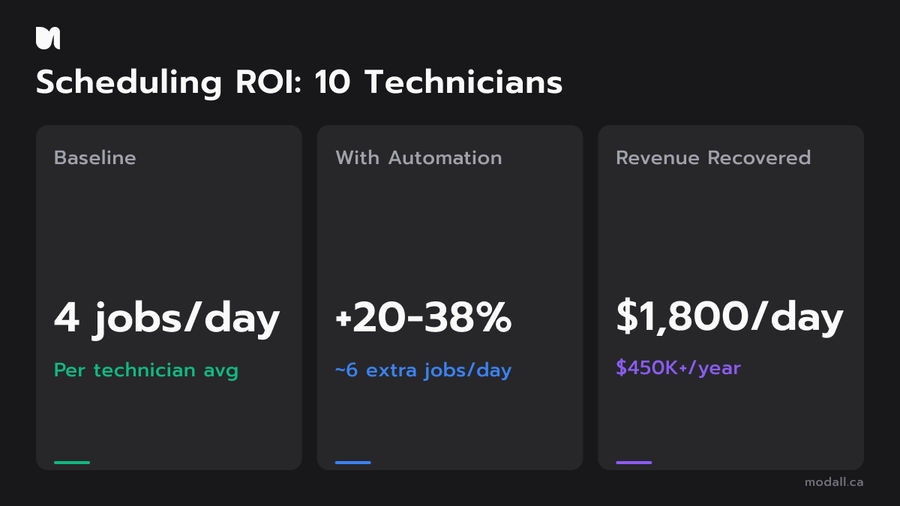
Automated scheduling systems solve this by factoring in technician location, skill set, job priority, and travel time to assign work instantly. Industry benchmarks show field service technicians typically complete three to five jobs per day. Companies implementing intelligent scheduling see 20 to 38% increases in daily job completion by cutting travel time and eliminating manual coordination gaps.
Example ROI Scenario
For a trades business running 10 technicians averaging four jobs each per day, that means four to eight additional completed jobs per day across your crew. If your average ticket is $300, that is $1,200 to $2,400 in daily revenue capacity that was previously lost to scheduling inefficiency, or roughly $300,000 to $600,000 per year.
What to Look for in Scheduling Software
The best field service management platforms for trades businesses include drag-and-drop scheduling boards, automated route optimization, real-time GPS tracking, and automatic customer notifications when a technician is en route. The critical feature is two-way sync: when a field tech marks a job complete, the schedule updates instantly for the entire team.
Mobile Forms, Digital Work Orders, and Real-Time Job Tracking
Paper work orders are one of the most expensive habits in the trades industry. 73% of field technicians report spending excessive time on paperwork, and the downstream effects compound: lost documents, delayed billing, inaccurate job records, and hours of admin time re-entering data into office systems.
Digital work orders replace all of that with a mobile app your technicians already carry in their pocket. A field tech arrives on site, opens the job on their phone, logs time and materials, captures photos of the work, collects a customer signature, and marks the job complete. That data syncs to your office system in real time.
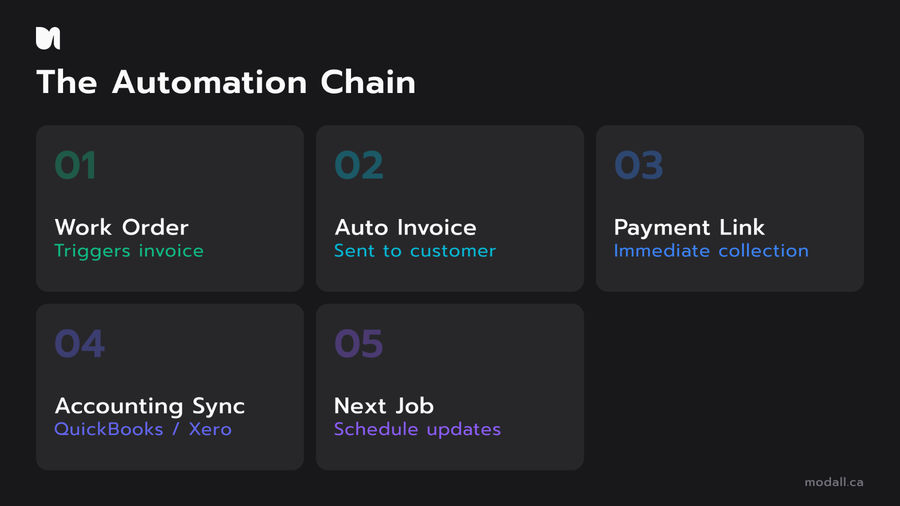
The Automation Chain
The real value of mobile forms is what happens after the technician submits them. In an automated system:
The completed work order triggers an invoice
The invoice sends to the customer automatically
Payment links are included for immediate collection
Job data syncs to your accounting software
The technician's schedule updates for their next job
This chain eliminates the 24 to 72 hour delay most trades businesses experience between job completion and invoice delivery. Faster invoicing means faster payment, which means healthier cash flow.
Companies using digital field service workflows report 78% cost savings compared to paper-based processes, with the biggest gains coming from reduced admin time and faster billing cycles.
Automated Invoicing and QuickBooks or Xero Integration
For most trades businesses, QuickBooks or Xero is the financial backbone. Any field service automation software that does not integrate directly with your accounting platform creates a data silo that defeats the purpose of automation.
When your field service system syncs with QuickBooks or Xero, invoices, customer records, and payment data flow automatically between the two systems. No double entry. No reconciliation headaches. No invoices falling through the cracks.
The financial impact is measurable. Businesses integrating field service software with their accounting platform report saving 15 to 20 hours per week on manual data entry alone. That is a part-time employee's worth of admin work, redirected to revenue-generating activity.
Build vs. Buy for Accounting Integration
Off-the-shelf field service platforms like ServiceTitan, Jobber, and Housecall Pro offer built-in QuickBooks and Xero connectors. These work well for standard workflows. But if your business has custom pricing models, multi-location billing, or non-standard job costing structures, a pre-built connector often cannot accommodate the logic without workarounds.
Custom-built integrations solve that by mapping your exact data model to your accounting system. The upfront investment is higher, but the long-term payoff is zero manual reconciliation and financial data you can trust. This is particularly true for trades businesses managing multiple service lines or complex warranty billing.
Customer Portals and Self-Service Booking
Customer portals are the part of field service automation that most trades businesses overlook, but they have an outsized impact on operational efficiency and customer satisfaction. For industries like construction, HVAC, and property services, a portal is often the difference between a business that feels modern and one that still asks customers to call during office hours.
A well-built customer portal lets your clients book appointments online, view upcoming and past jobs, check technician arrival status, approve quotes, and pay invoices, all without calling your office. For trades businesses that handle dozens of inbound scheduling calls per day, a self-service portal can reduce call volume by 30 to 50%.

The technology behind customer portals has gotten significantly more accessible. A modern web application built with frameworks like React and Next.js can deliver a fast, mobile-friendly portal that integrates directly with your scheduling and invoicing systems. The customer sees real-time job status. Your office sees real-time booking data. Nobody picks up the phone.
What a Good Portal Includes
At minimum, a trades business customer portal should offer online booking with available time slots, automated appointment confirmations and reminders, real-time technician tracking on service day, digital quote approval, online invoice payment, and job history with documentation. Each of these features reduces a manual touchpoint that currently requires staff time.
How We Build Field Service Automation at Modall
At Modall, we are a custom software development agency based in Ontario, Canada, founded in 2019. We have built field service tools, scheduling platforms, and operational dashboards for trades and service businesses that needed more than what off-the-shelf software could deliver.
Our approach starts with a structured Discovery process where we map your current workflows, identify the automation opportunities with the highest ROI, and define exactly what needs to be built. We focus on the five-system stack outlined in this guide: scheduling, mobile forms, invoicing, customer portals, and accounting integration, connected as a single platform rather than a collection of disconnected tools.
We build with TypeScript, React, Next.js, and PostgreSQL, which means your platform is fast, scalable, and maintainable. Our mobile app development work uses React Native, so your field technicians get a native mobile experience on both iOS and Android without doubling the development cost.
If your trades business has outgrown spreadsheets and generic FSM software, book a free consultation to explore what a custom-built automation platform could look like for your operation.
Frequently Asked Questions
What is field service automation?
Field service automation is the use of software to digitize and streamline field operations, including job scheduling, technician dispatching, work order management, invoicing, and customer communication. For trades businesses like HVAC, plumbing, and electrical contractors, it replaces paper-based processes with connected digital workflows that reduce admin time and improve cash flow.
How much does field service automation software cost?
Costs vary widely depending on whether you use off-the-shelf software or build custom. SaaS platforms like Jobber, ServiceTitan, and Housecall Pro range from $50 to $500+ per month depending on features and user count. Custom-built solutions have higher upfront costs but lower long-term total cost of ownership for businesses with complex or non-standard workflows. The FSM market is growing at over 10% annually, which means pricing and feature sets are evolving fast.
Can field service software integrate with QuickBooks or Xero?
Yes. Most major FSM platforms offer native QuickBooks and Xero integrations that sync customer data, invoices, and payments automatically. Integration eliminates manual data entry and keeps financial records accurate in real time. For businesses with custom billing logic, a purpose-built API integration provides tighter control over how data maps between systems.
What is the difference between FSM and CRM?
Field service management software coordinates field operations: scheduling, dispatch, work orders, and technician tracking. CRM software manages customer relationships: leads, sales pipelines, and communication history. Many trades businesses need both, and the best field service automation platforms include CRM-like features such as customer portals, job history, and automated follow-ups alongside core FSM functionality.
What ROI can a trades business expect from field service automation?
Most companies see measurable ROI within the first year. The biggest gains come from scheduling efficiency (20-38% increase in daily job completion), faster invoicing (eliminating 24-72 hour billing delays), and reduced admin time (15-20 hours per week saved on manual data entry). For a 10-technician operation averaging four jobs each, that means four to eight additional completed jobs per day. At a $300 average ticket, that is $1,200 to $2,400 in daily revenue capacity, or roughly $300,000 to $600,000 per year.
Your Playbook for Automating Field Operations
Field service automation is not a single software purchase. It is a connected system of scheduling, mobile forms, invoicing, customer portals, and accounting integration that eliminates manual work across your entire operation. Trades businesses that invest in this stack see measurable improvements in technician utilization, cash flow, and customer satisfaction within months, not years.
At Modall, we build these systems as unified platforms designed around how your business actually works. Get a free quote to start mapping out your automation playbook.