
How to Build an App in Canada: The Complete 2026 Guide
The Canadian mobile app market is booming. With over 95% of the population actively using the internet and mobile app revenue projected to grow significantly through 2030, there has never been a better time to turn your digital idea into reality.
Whether you are a startup founder in Toronto, a small business owner in Vancouver, or an enterprise leader in Montreal, the path to building a successful app is often paved with questions. How much does it cost? How do I get funding? What are the legal requirements in Canada?
This is not just another generic "how-to" article. This is your ultimate blueprint for how to create an app in Canada in 2026, covering everything from securing government grants like SR&ED to complying with PIPEDA privacy laws, to choosing the right tech stack.
As a leading mobile app development company in Toronto, we’ve created this guide to walk you through everything you need to know about building an app!

We teamed up with NFL star Chase Edmonds to build and launch the Sceene app.
Step 1: Validate Your App Idea (Before You Build)
Most apps fail not because of bad code, but because of a lack of market need. Before you spend a single dollar on development, you must validate that your idea solves a real problem for real Canadians.
Identify the Problem-Solution Fit
Your app should alleviate a specific pain point. For example, SkipTheDishes didn’t just build a food delivery app; they solved the problem of food delivery in mid-sized Canadian cities that UberEats initially ignored.
The Problem: "I can't find a dog walker in my specific Toronto neighborhood."
The Solution: An on-demand dog walking app with GPS tracking specifically for the GTA.
Conduct Market Research
You need data to back up your intuition. Use these tools to analyze the landscape:
Google Trends: Check if search volume for your solution is rising in Canada.
Sensor Tower: Analyze your potential competitors. How many downloads are they getting? What are users complaining about in their reviews?
Pro Tip: Look for 3-star reviews on competitor apps. These users like the concept but hate the execution. That gap is your opportunity to build a better version.
Real-World Case Study
We partnered with NFL wide receiver Alex Bachman to build the MVP for Vault Club, a private social networking golf app.

Before writing a line of code, Alex validated the concept by informally connecting NFL teammates with members at exclusive courses via text. It worked, but it wasn't scalable. We helped him transform that proven demand into an iOS app that allows affluent users to discover tee times and connect with members. The app is now in active testing to confirm the concept works as a digital platform.
Step 2: Define Your Business Model & Monetization
How will your app make money? In Canada, users are generally willing to pay for value, but you must choose the right model for your specific audience.
Monetization Model | Description | Best For | Example |
|---|---|---|---|
Freemium | Free to download, pay for advanced features. | Productivity & SaaS tools | Spotify |
In-App Ads | Free to use, revenue from ad impressions. | Gaming & Content apps | |
Subscription | Recurring monthly/yearly fee. | Content, Fitness, Utility | Netflix |
Transaction Fees | Commission on sales made through the app. | Marketplaces & E-commerce | Uber / Airbnb |
Paid Download | One-time cost to download. | Niche utility or Pro games | Minecraft |
According to Grand View Research, the Canadian mobile application market is expected to grow at a CAGR of 15.3% from 2025 to 2030. Choosing the right revenue model early ensures you capture a slice of this growing pie.

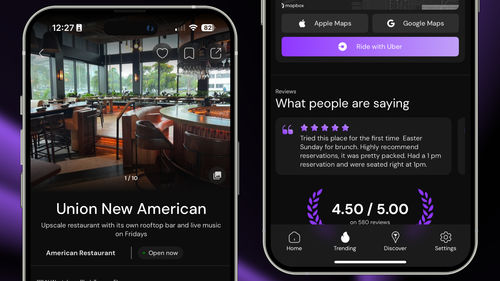
Image of Sceene: The social venue discovery app developed by the team here at Modall.
Step 3: Secure Funding & Understand Canadian Grants
This is the section most "how-to" guides miss. Canada is one of the best places in the world to build technology because of our generous government incentives. You do not always need Venture Capital; you can leverage non-dilutive funding to finance your app build.
1. SR&ED Tax Incentives
The Scientific Research and Experimental Development (SR&ED) program is the largest source of federal government support for industrial R&D.
What it is: If your app involves overcoming a "technological uncertainty" (i.e., you are doing something technically difficult that hasn't been done before), you can claim tax credits.
The Benefit: Canadian-controlled private corporations (CCPCs) can earn a refundable investment tax credit of up to 35% on eligible R&D expenditures (like developer salaries).
Learn More: Read the PwC guide on SR&ED to see if your project qualifies.
2. NRC IRAP
The Industrial Research Assistance Program (IRAP), run by the National Research Council of Canada, offers grants to small and medium-sized businesses to help them grow through innovation.
Difference from SR&ED: While SR&ED is a tax credit (you get money back after you spend it), IRAP is often a grant (you get money to spend).
Eligibility: You typically need to be incorporated, have under 500 employees, and have a plan to commercialize your technology.
Resource: Check the eligibility criteria for IRAP here.
3. Government of Canada Business Benefits Finder
Grants change frequently. To find the latest funding you qualify for, use the official Business Benefits Finder tool from the Government of Canada.
Step 4: Write the Features List (Define the MVP)
To create an app successfully, you must avoid "scope creep." This is when you try to build too much too soon, exhausting your budget before launch. Instead, focus on the Minimum Viable Product (MVP).
An MVP is the version of your app with just enough features to satisfy early customers and provide feedback for future product development.
How to prioritize features (The MoSCoW Method):
Must-Have: The app is useless without these (e.g., "Login," "Search," "Checkout").
Should-Have: Important but not vital for day one (e.g., "Social Login," "Reviews").
Could-Have: Nice to have if time permits (e.g., "Dark Mode," "Referral Program").
Won't-Have: Save for Version 2.0 (e.g., "AI Chatbot," "Multi-language support").
Need help with MVP development for your app? Contact our team today!
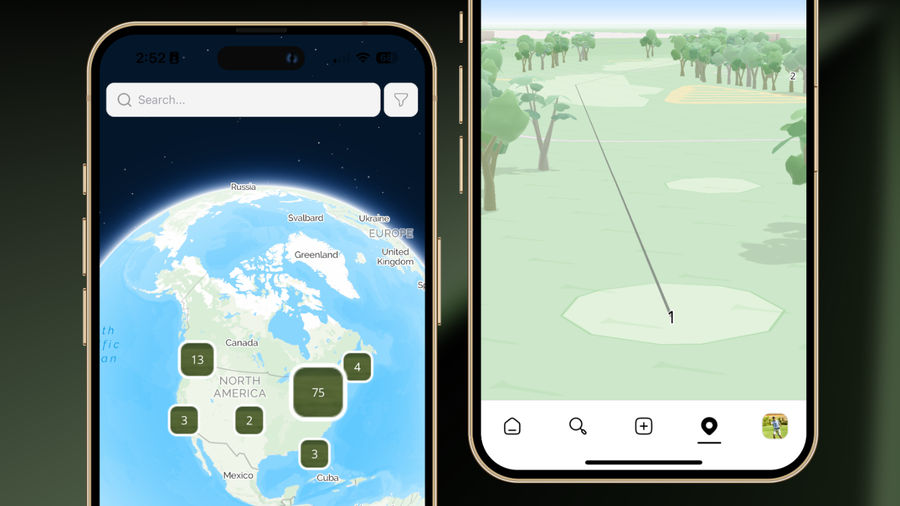
Image of Vault Club's MVP iOS app, featuring an interactive map for course discovery.
Step 5: Design the UI/UX
Design is not just about how the app looks (UI), but how it works (UX). Canadian users have high standards; if your app is clunky or ugly, they will delete it within seconds.
Wireframing
Think of wireframes as the architectural blueprints of your app. They are black-and-white sketches that show where buttons, images, and text will go. This allows you to fix navigation issues before writing a single line of code.
Prototyping
A high-fidelity prototype adds color, fonts, and interactions. Tools like Figma or Adobe XD allow you to create a "clickable" version of your app that looks real but has no backend code. This is essential for showing investors or stakeholders what the final product will look like.
Accessibility Compliance (AODA)
In Ontario, the Accessibility for Ontarians with Disabilities Act (AODA) requires digital products to be accessible to people with disabilities. This includes using proper color contrast, scalable text, and screen-reader compatibility. Designing with accessibility in mind isn't just the law, it expands your market reach.

Real world example from Modall: The transition from grayscale wireframes (structure) to the full-color, polished UI (ChatBowl) helps finalize the user experience before development begins.
Step 6: Choose Your Tech Stack
How will you build the app? You generally have three options.
1. Native Development (iOS & Android)
Tech: Swift (iOS) and Kotlin (Android).
Pros: Highest performance, full access to device hardware (camera, GPS, AR).
Cons: Most expensive. You are essentially building two separate apps (two codebases) which doubles the development and maintenance effort.
2. Cross-Platform Development (Recommended)
Tech: Flutter or React Native.
Pros: Write one codebase that runs on both iPhone and Android. This creates a unified user experience and significantly reduces development costs (often by 30-40%).
Cons: Slightly lower performance for high-end 3D gaming, but indistinguishable for 95% of business apps.
3. No-Code/Low-Code Builders
Tech: Bubble, Adalo.
Pros: Very cheap and fast.
Cons: Limited customization, you don't own the source code, and difficult to scale. Good for prototypes, bad for serious businesses.
At Modall, we often recommend cross-platform solutions for startups to maximize budget without sacrificing quality. Our team specializes in React Native development.

Image of Shop Tweak, an automotive SaaS product developed by Modall.
Step 7: Development & Legal Compliance
This is the phase where the coding happens. However, developing an app in Canada comes with specific legal responsibilities regarding data privacy.
Frontend vs. Backend
Frontend: The part of the app the user sees.
Backend: The server, database, and logic that powers the app (where user data is stored).
Canadian Data Privacy Laws (PIPEDA)
If your app collects any personal data (name, email, IP address, location) from Canadians, you must comply with the Personal Information Protection and Electronic Documents Act (PIPEDA).
Key PIPEDA Principles for App Developers:
Consent: You must get explicit consent to collect data.
Purpose: You must state why you are collecting it.
Security: You must protect that data with proper encryption.
Breach Notification: You must notify users if their data is compromised.
For a deep dive, consult this guide on PIPEDA compliance for mobile apps.
Anti-Spam Legislation (CASL)
If your app sends emails or push notifications, you must comply with CASL. You cannot send commercial electronic messages (CEMs) without express consent, and you must include a working "unsubscribe" mechanism. Failing to comply can result in massive fines. Read more on the Government of Canada's CASL page.
Step 8: Quality Assurance (QA) & Testing
Never launch an app without rigorous testing. A buggy launch can destroy your brand reputation instantly.
Functional Testing: Does every button works? Can a user reset their password?
Performance Testing: Does the app crash if 1,000 users log in at once?
Usability Testing: Watch real users try to navigate your app. Where do they get stuck?
Device Testing: Test on various screen sizes (from older iPhones to the latest Samsung Galaxy).
Beta Testing: Use TestFlight (for iOS) and Google Play Console (for Android) to distribute a pre-release version to a small group of trusted users for feedback.

Image of the Sceene mobile app's short-form video feed for venue discovery.
Step 9: Launch on App Stores
You are ready to go live. But you can't just upload a file; you need to navigate the strict submission processes of Apple and Google.
App Store Optimization (ASO)
Just like SEO helps websites rank on Google, App Store Optimization (ASO) helps apps rank in the App Store.
Keywords: Use terms like "app development," "fitness tracker," or your niche keywords in the title and description.
Visuals: High-quality screenshots and preview videos are the biggest factor in conversion rates.
Localization: If you are targeting all of Canada, ensure your app listing is available in both English and French.
Submission Checklist
Apple App Store: Requires a $99/year developer account. Review times can take 24-48 hours. They are strict about UI guidelines and privacy.
Google Play Store: Requires a one-time $25 fee. Generally more lenient but has automated checks for malware and policy violations.

Image of Vault Club, an exclusive social networking golf app developed by Modall.
Step 10: Post-Launch Marketing & Maintenance
Launching is just the starting line.
Marketing Your App in Canada
Social Media: TikTok and Instagram Reels are powerful for demonstrating app features.
Influencer Marketing: Partner with Canadian micro-influencers who align with your niche.
Maintenance
Apps are like cars; they need oil changes.
OS Updates: Every year, Apple and Google update their operating systems (iOS 18, Android 15). Your app must be updated to stay compatible.
Bug Fixes: You will find bugs after launch. Guaranteed.
New Features: Use user feedback to guide your roadmap.
How Much Does It Cost to Create an App in Canada?
This is the most common question we get at Modall. The cost varies wildly based on complexity.
Based on 2024/2025 market data, here are realistic estimates for building an app in Canada:
App Complexity | Features | Estimated Cost (CAD) | Timeline |
|---|---|---|---|
Simple App (MVP) | Standard UI, basic features, no complex backend. | $15,000 - $40,000 | 2 - 3 Months |
Standard / Advanced App | Custom UI, API integrations, payment gateway, user profiles. | $40,000 - $100,000 | 4 - 6 Months |
Complex App | Advanced tech (AI, AR), real-time updates, enterprise security. | $100,000+ | 6 - 9+ Months |
Note: These ranges are for professional agency development. Freelancers may be cheaper but carry higher risk; large enterprise consultancies will be significantly more expensive.
For a more detailed breakdown, you can reference this breakdown of Canadian app development costs.

Image of Sceene's mobile app onboarding flow.
Frequently Asked Questions (FAQ)
How long does it take to create an app?
On average, it takes 3 to 6 months to develop a mobile app. A simple MVP (Minimum Viable Product) can be ready in 3 months, while a complex enterprise application may take 9 months or more.
Do I need to know how to code to build an app?
No. You can hire a professional app development agency like Modall to handle the technical execution. Alternatively, you can use no-code platforms for simple prototypes, though these have limitations for scaling.
What is the difference between Native and Hybrid apps?
Native apps are built specifically for one platform (iOS or Android) using languages like Swift or Kotlin. Hybrid (or cross-platform) apps use frameworks like Flutter to run on both platforms from a single codebase, saving time and money.
How do I protect my app idea?
Before discussing your idea with developers or investors, ask them to sign a Non-Disclosure Agreement (NDA). This is a standard legal contract that prevents them from sharing your intellectual property.
How to create an app step by step guide?
To create a successful mobile app, follow this proven process:
Validate your idea: Ensure there is market demand.
Define the MVP: List only the "must-have" features.
Design the UI/UX: Create wireframes and prototypes.
Choose your tech stack: Decide between Native or Cross-Platform.
Develop the app: Write the code for the frontend and backend.
Test rigorously: Perform QA to fix bugs and ensure security.
Launch: Submit to the Apple App Store and Google Play Store.
What are the 7 steps to creating an app?
The standard mobile app development lifecycle consists of these 7 key steps:
Strategy: Defining the goals and target audience.
Analysis & Planning: creating the roadmap and feature list.
UI/UX Design: Building the visual interface and user journey.
App Development: Coding the application.
Testing: Identifying bugs and ensuring quality assurance (QA).
Deployment: Publishing the app to the iOS and Android stores.
Maintenance: Updating the app and monitoring performance post-launch.
How to create an app in 2026?
Creating an app in 2026 requires focusing on speed and efficiency using modern tools. Start by validating your idea with data tools like Google Trends. Next, choose a cross-platform framework like React Native or Flutter to build for both iOS and Android simultaneously, saving time and budget. Finally, prioritize launching a Minimum Viable Product (MVP) to gather user feedback early rather than spending years on development.
What programming language is best for apps?
The best programming language depends on your platform strategy, but React Native (JavaScript) is widely considered the best choice for startups in 2026.
Best for Cross-Platform (iOS & Android): React Native or Flutter (Dart).
Best for iOS Native: Swift.
Best for Android Native: Kotlin.
Best for Enterprise Backend: Node.js or Python.
Ready to Build Your App?
Creating an app is a journey, but you don't have to walk it alone. From validating your idea to launching on the App Store, having the right partner makes all the difference.
At Modall, we specialize in helping Canadian businesses build world-class mobile applications. We don't just write code; we help you build a business.
If you’re looking for a professional team to turn your app idea into reality, Modall offers end-to-end mobile app development for iOS, Android, and cross-platform solutions. Contact us today to discuss your project and take the next step in app development!
Do you have an app idea? Contact Modall today!