Project
Sceene
Tags
Service
Mobile App Development
Date
Mar 22, 2025
How We Built a Social Media App for Nightlife Discovery | Case Study
Sceene
Sceene is a nightlife discovery app founded by NFL running back Chase Edmonds. We rebuilt it end to end and shipped it to the App Store and Google Play using React Native and Expo for a fully cross-platform experience.






React Native Mobile App Development for Sceene
Sceene is a mobile app that helps you discover the perfect night out, matching you with venues, events, and experiences based on your location and preferences. Browse an interactive map and a short form video feed to preview the vibe, then save and share favourites with friends. Get personalized recommendations, and use Sceene Passes to unlock perks at participating venues. In short, its a social media style travel app for nightlife discovery!
Project Overview
Project | Details |
|---|---|
Client | Chase Edmonds, NFL running back and founder of Sceene |
Industry | Nightlife discovery, travel |
Platforms | iOS and Android |
Stack | TypeScript, React Native, Expo / EAS, NestJS, Next.js, Prisma (monorepo) |
Our role | Full rebuild of the mobile app, architecture and code-quality overhaul, integrations, ongoing product development |
Result | Rebuilt the entire app and launched on the App Store in under 6 weeks |
Client Testimonial
In this video, Chase breaks down his experience working with Modall and what it's been like building Sceene together.

The Challenge: Rebuilding From the Ground Up
When we got repo access, the app had gone through a long stretch of development with another team but still hadn't made it to the App Store. After a full audit, we found significant technical debt: a fragile architecture that blocked new features, rendering pitfalls, and memory leaks throughout the codebase.
Rather than patch individual problems on an unstable foundation, we determined a full rebuild would be faster and more cost-effective. That gave us a clean starting point to build something production-ready.
Core Objectives for the MVP
1. Get App Store Approval
The app hadn't yet passed Apple's review process. One key requirement was that apps requesting user registration must deliver personalized, non-public content after sign-in. The existing version didn't meet that bar, so our job was to close the gap and ship a version that passed review.
2. Enhance the Data for Personalized Venue Discovery
The goal was to help users find venues more intuitively than generic “clubs near me” searches on Google, cutting through ads and noise. To do that, we needed to find better data sources (to enrich the venue details), and build a personalization engine that matched user preferences to venues for more accurate recommendations in the feed.
3. Build a Scalable Admin Portal to Manage the App
The existing process to add venues, upload Sceenes (short-form videos), and manage content wasn’t workable. The team needed a way for non-technical staff to handle this at scale.

Our Approach to Rebuilding Sceene
After meeting the team, aligning on the vision, and reviewing the repo, we laid out a plan focused on fast MVP readiness and long-term scalability
Phase 1: Foundation Fix & Code Cleanup
Merge all existing changes from the previous developers first to avoid major merge conflicts.
Perform a full refactor & cleanup of the app. Bring code quality up to standard.
Phase 2: Optimizing Code Quality
Convert the entire app to TypeScript. Go through every file to eliminate code smells, rendering issues, and memory leaks.
Post‑refactor review: conduct a thorough review after stabilization (code reviews before this stage would be inefficient due to upstream issues in the render tree).
Phase 3: Short‑Term (MVP Readiness)
Sprint to the finish line with a production‑ready app, focusing on minor fixes and major blockers.
Improve user experience to boost engagement and retention.
Use TypeScript for scalability and maintainability; start enhancing the data source to strengthen core business logic.
Phase 4: Mid‑Term (Scalability & Growth)
This sequence prioritized foundational issues first, so subsequent features delivered compounding value.

Collaborating From Kickoff to App Store Launch
Once we onboarded their team to a dedicated Slack channel and set up a Notion client portal for live task tracking, we ran weekly sprint calls and bi-weekly team syncs to plan each phase of development. Once the MVP was live on the App Store, those calls shifted to refining the experience, iterating on user feedback, and shipping new features, which led to the app you can download and try today.
Download Sceene here:
What We Built: A Social Nightlife App on iOS & Android
The app has a lot of really cool features. I won’t cover them all here, but I’ll hit a few favourites.
Why Users Love Sceene
Trending short-form feed: TikTok-style venue videos to preview the vibe before you go
Personalized discovery: recommendations for bars, clubs, lounges, and events based on preferences and location
Social sharing: like, bookmark, and share favorites to coordinate nights out with friends
Sceene Passes: unlock perks and rewards at partner venues
Curated Home feed: city-specific sections (trending, editor’s picks, new openings), editable via a web drag-and-drop builder
Push notifications: key updates and re-engagement prompts
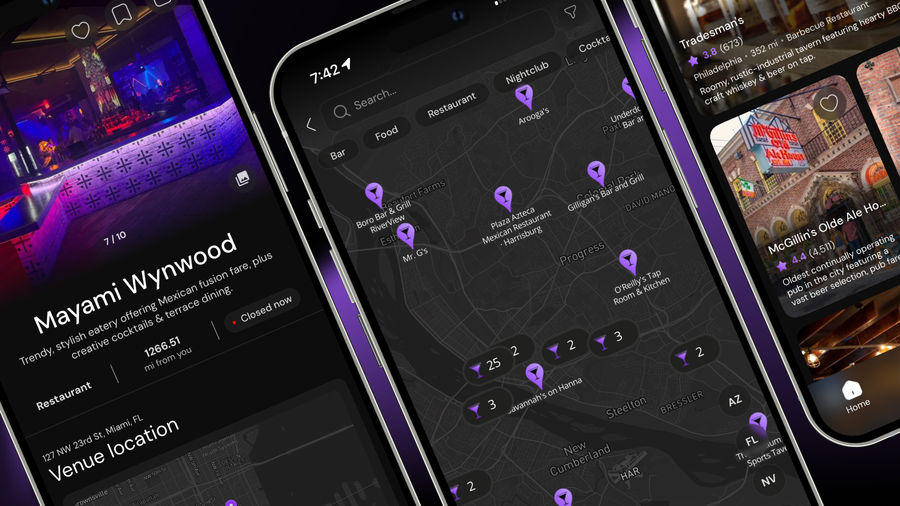
Interactive map: Mapbox with filters and search; tap icons for venue details, switch to list view for in-viewport results, and get directions.
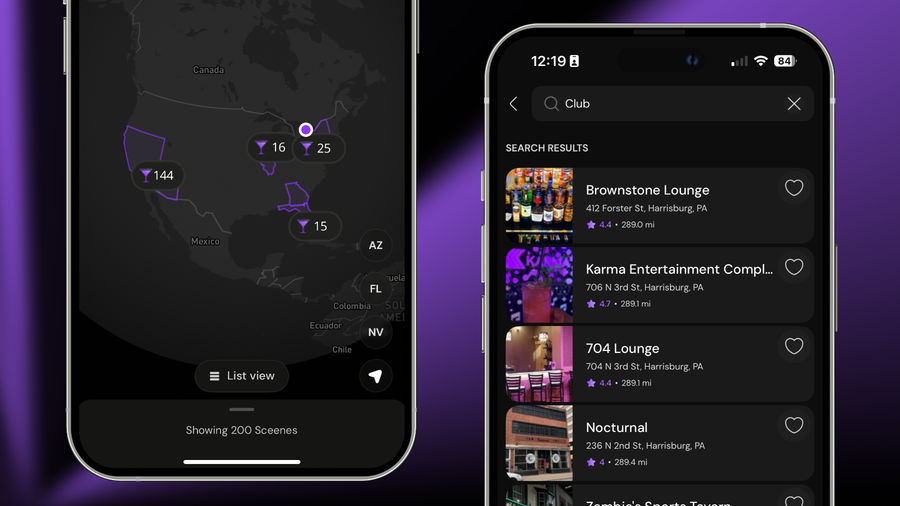
Built for personalized discovery, Sceene matches users with venues they’ll love and helps those venues bring in more guests.
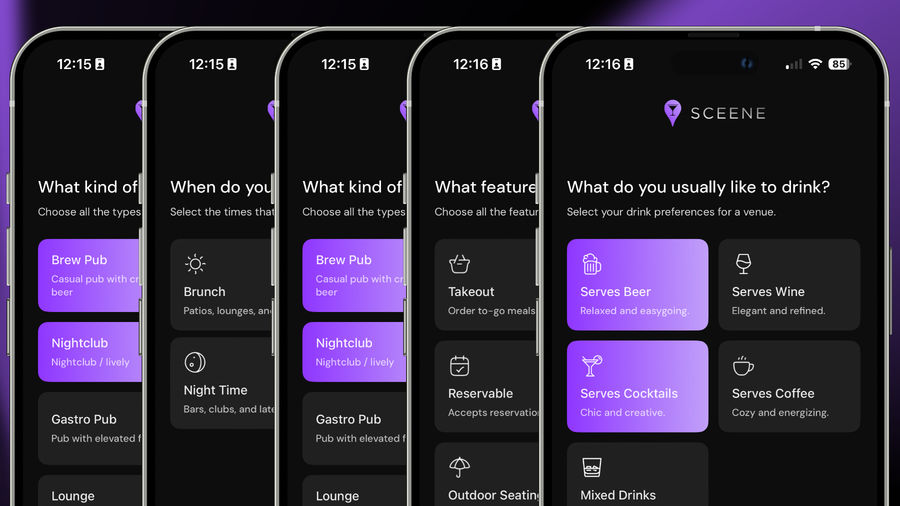
Onboarding That Personalizes Your Experience
We designed onboarding to be quick, simple, and engaging. With a clean, fast UI, we gather a few key preferences that power personalized venue recommendations. Those signals help us surface the right venues and personalize each user's experience across the app.
Curated Home Feeds Editable via a Drag-and-Drop Builder
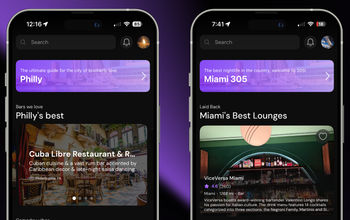
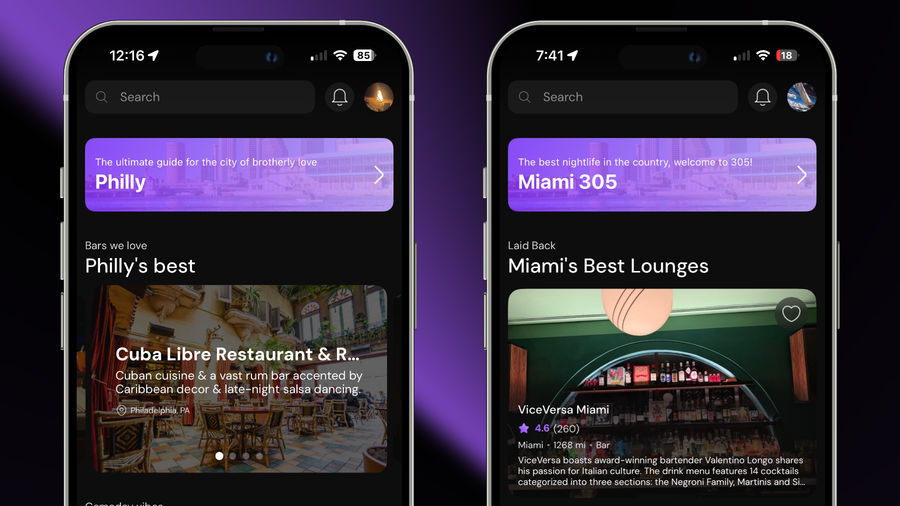
The Home Feed is tailored to each user's location and highlights curated venues we think they'll love. It surfaces the best of each city at a glance and makes it easy to find what they're looking for.
The cool thing about the Home Feed is that, through the admin portal we built, the Sceene team can edit and update the feed from the web using a drag-and-drop builder. That lets them curate venues, change the layout, and adjust what users see with no developer intervention. For example, the home feed for Philadelphia has a different layout than Miami!
Key features
Multiple content sections. Vertically stacked rows organized by category, city, or recommendation type, including trending, editor’s picks, and new openings.
Venue cards with image carousels. Each card includes a swipeable image viewer for a richer preview right in the feed.
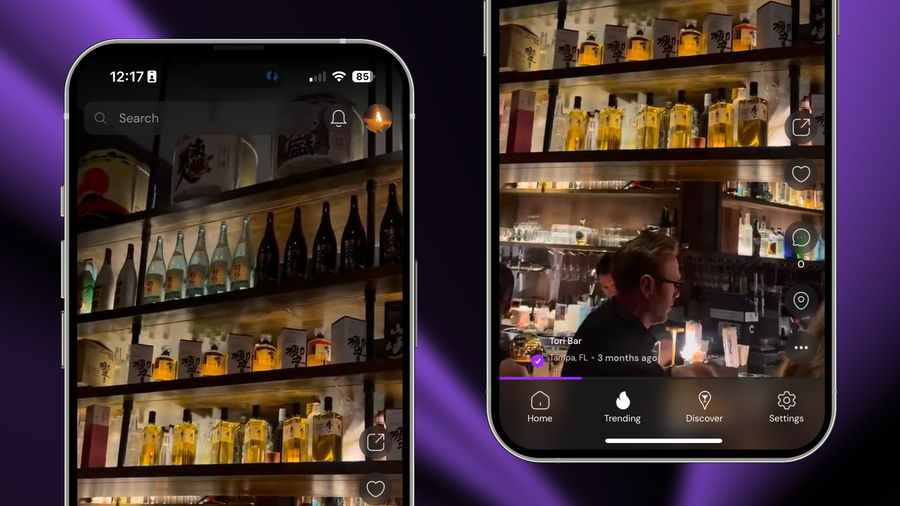
A Social Feed for Venue Discovery
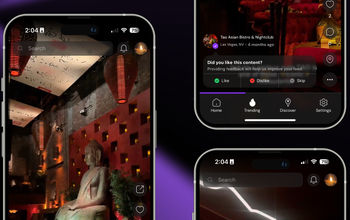
The key to mobile app development is stickiness, meaning how long people stay and keep coming back. In 2026, short form content is king, so we brought it into Sceene with a fast, visual, social feed that keeps users exploring venues longer.

The feed contains short form videos tailored to each user's preferences and location. It brings the familiar social media scroll everyone loves to nightlife discovery, letting you explore venues and get the vibe before you go. You can like, comment, and share as you browse. Every video is attached to its venue, so a tap takes you straight to the venue page for details, maps, directions, or booking when available.
Interactive Location-Based Map (Built with Mapbox)
The Discover page is a fully interactive map powered by Mapbox. Use filters to zero in on the type of venue you want, and a search tab when you already know what you’re looking for. As you pan or zoom, venues in your viewport appear in real time. Tap any map icon to zoom in and explore.

When you select a venue, a card slides up from the bottom with a photo, name, and short description. A horizontal carousel lets you jump between nearby venues without leaving the map. Switch to the List View at the bottom to see a full-page, vertical list of the venues currently in view.
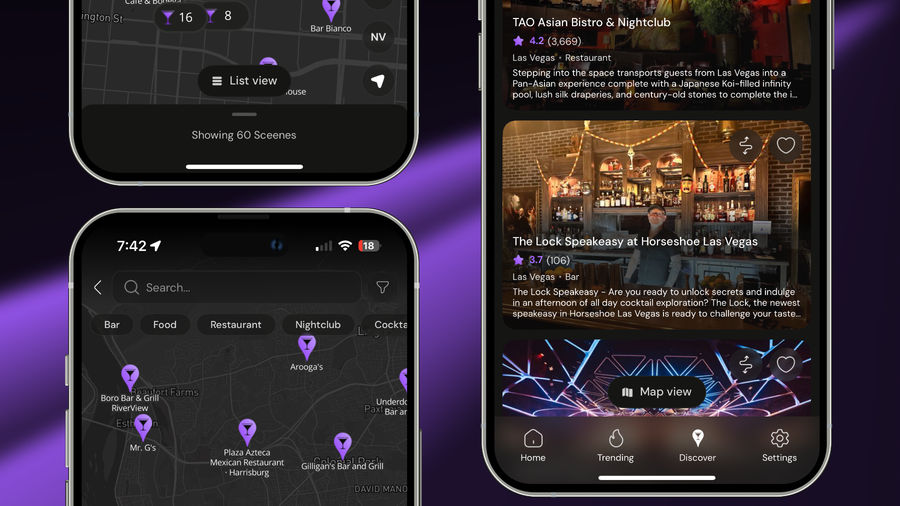
The coolest part (in my opinion) about the discover page is the directions. Tap the directions icon and the app uses your location to outline the distance to that venue on the map so you can see how far it is right away. If you haven't yet, go try it out yourself!

Venue Pages That Replace the Google Search
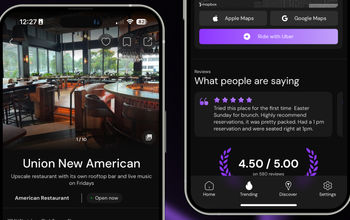
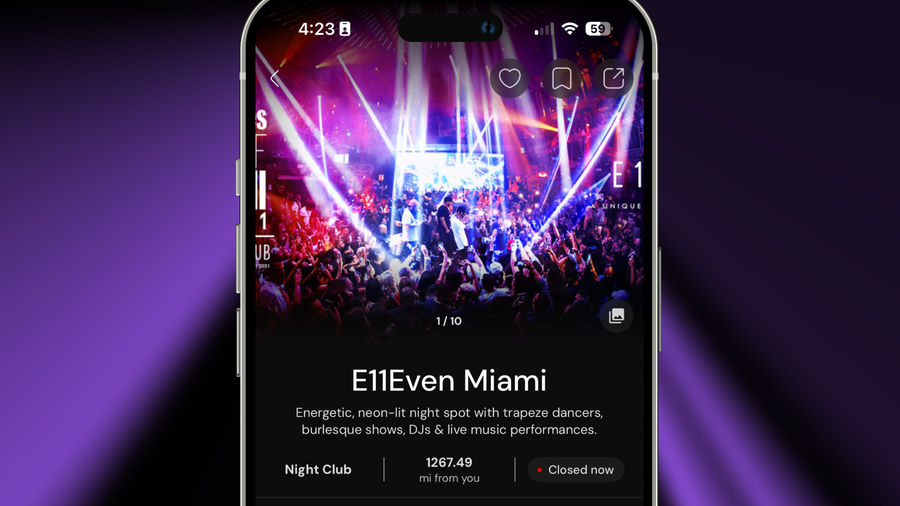
The premise of the app is to help users discover venues in a more intuitive way than what’s currently on the market. To bridge that gap, each venue has a dedicated page powered by multiple data sources, so users get more complete and trustworthy information in one place.
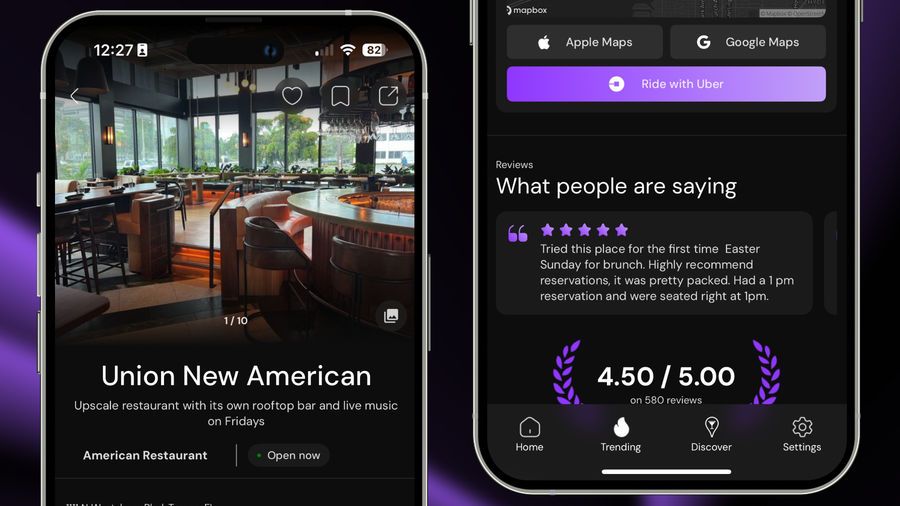
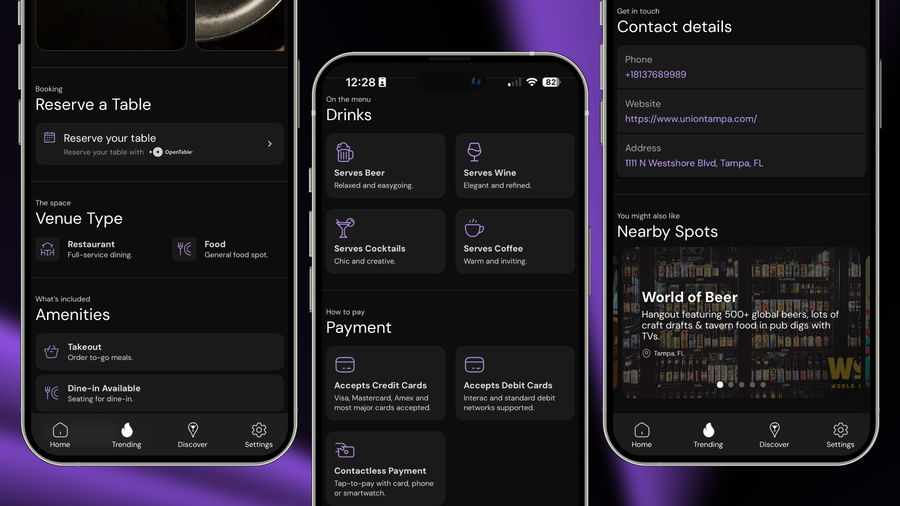
What a venue page includes
Details about the venue
Curated images
Distance from the user and open/closed status
An interactive map with three navigation options: Apple Maps, Google Maps, or an Uber ride request
Reviews
Booking for venues that have an OpenTable account
Operating hours and clear contact info (phone, website, address)
A section showing any short-form videos for that venue
A carousel of nearby spots users might also like
Built for engagement and sharing
Users can like, bookmark, and share any venue. Likes feed into the preference engine so recommendations get better over time, and sharing drives organic growth for the app.
Next.js Admin Portal for No-Code Updates
Another challenge was the content workflow and overall app management. Adding venues, Sceene's (short-form videos), and other assets required developer help. The team needed a simple way for non-technical staff to handle everything at scale.
We built a centralized web portal with Next.js that puts day-to-day updates in the team’s hands.
Adjusting the home screen feed layout
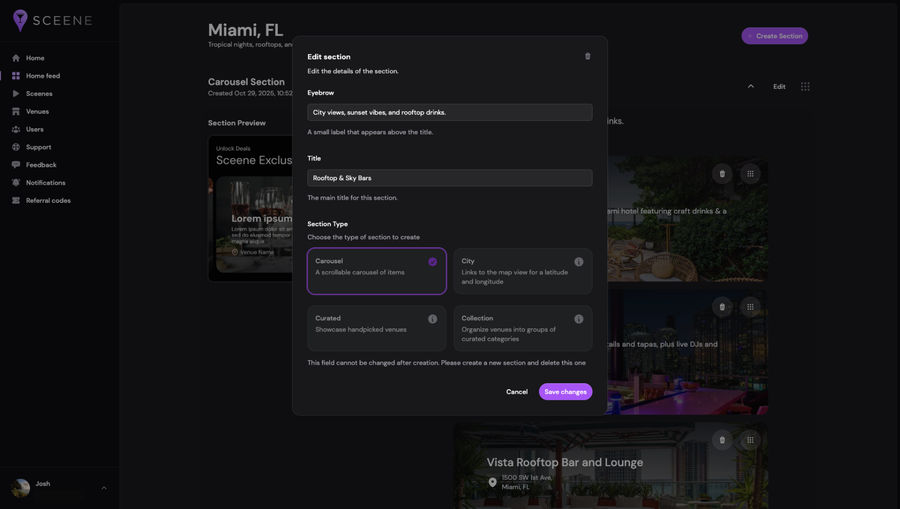
The home feed is fully editable from the web. Drag, drop, and reorder sections to curate what users see in each city.
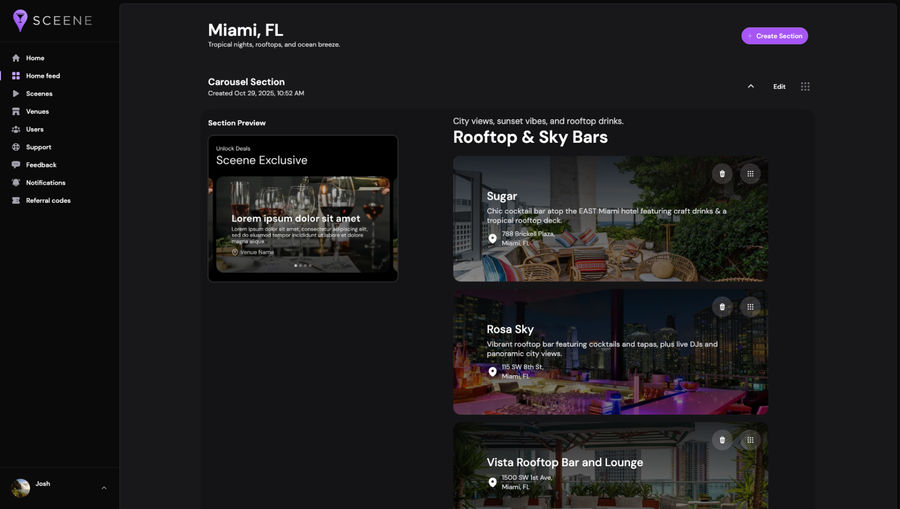
Admins can swap modules, change layouts, and push live updates to the app without touching the code. They can then fine-tune the content inside each module, including updating cards, headlines, and imagery in seconds.
In short, we built their mobile app and gave them a no-code way to edit it in real time. Pretty cool, eh?
Adding and edit venues
The portal makes venue management straightforward: upload new venues, or search, filter, and open any venue to review its details. Click any venue to edit info, media, categories, and more.
Other Management Tools & Features
Beyond venues and feed layout, the portal includes tools to manage users, moderate Sceenes, create passes, track support and feedback, send push notifications, and more. All without writing code or waiting on developers. The portal puts day-to-day operations in the team’s hands and keeps shipping velocity high.
Tech Stack & Architecture
Mobile
TypeScript
React Native
Expo / EAS
Backend & Web
TypeScript
NestJS (API)
Next.js (admin portal)
Prisma ORM
Monorepo strategy to consolidate surfaces and accelerate future features
The Results: A Look Behind the Sceene
In under six weeks, we rebuilt the entire MVP from the ground up, shipped it to the App Store, and became Sceene’s full tech partner managing the product end to end (thank you Chase, for trusting Modall). The result is a cross platform React Native + Expo app available on iOS and Android.
Shipped to stores fast: from takeover to App Store launch in ~6 weeks
Type‑safe foundation: accelerated delivery with fewer regressions
Higher iteration velocity: new features shipped continuously
Ready for scale: clean architecture, stable CI/CD, and clear ownership boundaries
- Weeks to Launch
- <6
- App Store Rating
- 5.0
- Uptime
- 100%

Need a Mobile App Development Company?
Have a new app in mind? We’ll help you define the scope, design the experience, and build a cross-platform mobile app that’s ready for real users. Already have an app but it’s slow, buggy, or hard to change? We’ll audit the code, fix the foundations, modernize the stack, improve performance, and set up the tooling and workflows your team needs to move quickly. In both cases, you get a team that owns delivery end to end, with clear progress every week.
Let’s talk about your build → Get a free quote
Add a comment
This will be publicly visible.
Your email address will not be published.
Your comment will be reviewed by the admin before it is published.