

Client portal development is one of the most requested custom software projects for B2B companies in 2026, and for good reason. A well-built portal centralizes document sharing, project tracking, invoicing, and communication into a single branded experience that clients can access around the clock. The global client portal software market is valued at USD 1.81 billion in 2026 and is projected to reach USD 3.38 billion by 2033, growing at an 8.1% CAGR.
This guide covers everything you need to know about building a client portal: from choosing between custom development and off-the-shelf tools, to technical architecture, security requirements, cost ranges, and the features that actually matter.
If you're scoping a client portal project and want to skip ahead, get a free quote from our team to discuss your requirements.
What Is a Client Portal and Why Your Business Needs One in 2026
A client portal is a secure, authenticated web application where your customers log in to access information, documents, project updates, support, and billing specific to their account. Unlike a public-facing website, every user sees only their own data, protected by role-based permissions and authentication.
The business case is hard to ignore. Research shows that 67% of consumers prefer self-service over speaking to a representative for routine inquiries, and 81% of customers attempt to resolve issues themselves before reaching out to a live agent. A client portal meets that demand directly.
For B2B service companies, portals solve three problems simultaneously. First, they reduce support volume. Well-designed portals deflect 40 to 60% of incoming client queries by giving customers the answers and access they need on demand. Second, they improve client retention. Clients who can self-serve, track their projects in real time, and access documents without waiting for email replies report higher satisfaction scores. Third, they create a competitive moat. A branded portal with polished functionality signals professionalism and operational maturity that spreadsheets and email chains simply cannot match.
Organizations with self-service portals see an average 45% increase in customer satisfaction scores, according to 2026 customer service benchmarks.
The demand is accelerating because client expectations have shifted. The same people using consumer-grade apps like banking portals and logistics trackers now expect that same level of visibility and control from the businesses they work with professionally. For SaaS companies in particular, a client portal is often a core part of the SaaS business model itself, serving as the primary interface through which customers interact with the product.
Build vs Buy: Custom Development vs Off-the-Shelf Portal Software
The first decision in any client portal project is whether to build custom or use an existing platform. Both paths work, but for very different situations.
Off-the-shelf tools like Softr, Knack, and Moxo let you spin up a basic portal quickly, often in days. They connect to spreadsheets or databases, offer pre-built components for login, forms, and lists, and handle hosting for you. For a small business that needs simple document sharing or project status updates for a handful of clients, these tools are a reasonable starting point.
Custom development makes sense when your requirements go beyond what templates can handle. That includes complex role-based permissions across multiple user types, integrations with your existing ERP, CRM, or accounting systems, compliance requirements like SOC 2 or PIPEDA, custom workflows that match your specific business processes, and the need to scale to hundreds or thousands of concurrent users.
Factor | Off-the-Shelf Tools | Custom Development |
|---|---|---|
Time to launch | Days to weeks | 8 to 16+ weeks |
Upfront cost | $50 to $500/month | $30,000 to $150,000+ |
Customization | Limited to templates | Unlimited |
Integrations | Pre-built connectors | Any API or database |
Compliance (SOC 2, PIPEDA) | Depends on vendor | Built to your spec |
Scalability | Platform-dependent | Architected for growth |
Ongoing cost (3-year) | $1,800 to $18,000 | $5,000 to $20,000/year |
The hidden cost of off-the-shelf solutions shows up over time. Per-user pricing on platforms like Knack or Softr compounds as your client base grows. A portal serving 500 users on a $500/month plan costs $18,000 over three years before any customization. At that point, you're locked into a platform's constraints while paying a premium for features you may never use.

Custom-built portals have higher upfront investment but lower marginal costs per user, full ownership of the codebase, and no vendor lock-in. For companies with more than 50 active portal users or any compliance requirements, custom development typically offers better long-term value.
Core Features Every Client Portal Needs
Not every portal needs every feature. But the following capabilities cover what most B2B service companies require, and they form the foundation that everything else builds on.
Authentication and user management is non-negotiable. Every portal needs secure login with email/password or SSO (single sign-on), multi-factor authentication for sensitive data, and the ability to manage user roles. Enterprise clients will expect SSO integration with their identity providers, typically through SAML or OAuth 2.0.
Role-based access control (RBAC) ensures that each user sees only what they should. A client admin might see billing and all project data, while a project member sees only their assigned deliverables. On the provider side, account managers might have read-write access while support staff has read-only.
Document management handles file uploads, version control, and organized storage. Clients need to download deliverables, upload briefs and assets, and reference historical documents without digging through email.
Project tracking and status dashboards give clients real-time visibility into work progress. This can range from simple status indicators to detailed milestone timelines with completion percentages, depending on your service model.
Messaging and notifications keep communication in context. Threaded comments tied to specific projects or documents eliminate the "check your email" problem. Automated notifications for status changes, new uploads, and upcoming deadlines keep clients engaged without manual follow-up.
Invoicing and payment integration lets clients view, download, and pay invoices directly in the portal. Integrations with Stripe, QuickBooks, or Xero keep financial data synchronized without double entry.
Feature | Priority Level |
|---|---|
Secure login (email + password) | Essential |
Multi-factor authentication | Essential |
Role-based access control | Essential |
Document upload/download | Essential |
Project status dashboard | Essential |
Real-time notifications | Essential |
SSO (SAML/OAuth 2.0) | Mid-range and above |
File version control | Mid-range and above |
In-portal messaging | Mid-range and above |
Invoice viewing and payment | Mid-range and above |
White-label branding | Mid-range and above |
Audit logging | Enterprise |
Custom reporting | Enterprise |
For a deeper look at the full software development lifecycle that applies to portal projects, our guide on how to create an app walks through the process from concept to launch.
Technical Architecture for Custom Client Portals in 2026
A custom client portal is a full-stack web application, and the architectural decisions you make early on determine how well it scales, how secure it is, and how expensive it is to maintain.
Frontend: What Clients See and Interact With
The frontend is the interface your clients use daily, so performance and usability matter. React with Next.js is the dominant choice for portal frontends in 2026. Next.js provides server-side rendering (SSR), which means pages load fast and are indexable by search engines for any public-facing portal content. TypeScript adds type safety across the entire codebase, catching bugs during development instead of in production.
For styling, Tailwind CSS has largely replaced traditional CSS frameworks for portal interfaces because it produces smaller bundles, allows rapid iteration on designs, and maintains consistency across components.
Backend: Business Logic and Data
The backend handles authentication, authorization, data processing, and API management. Node.js with TypeScript is a strong choice because it shares the same language as the frontend, reducing context-switching and allowing code reuse across the stack.
An ORM like Prisma simplifies database operations and provides type-safe queries that prevent entire categories of bugs. For the database itself, PostgreSQL remains the gold standard for portal applications. It handles complex queries efficiently, supports JSON for flexible data structures, and offers strong ACID compliance for financial and transactional data.
API Layer
REST APIs are the standard for portal integrations, but GraphQL is increasingly popular when portal interfaces need to pull data from multiple sources in a single request. A well-designed API layer also makes it straightforward to build mobile apps or third-party integrations on top of the same portal backend later.

Infrastructure and Hosting
Cloud hosting on platforms like Digital Ocean, AWS, or Google Cloud provides the scalability portals need. Key infrastructure decisions include:
Containerized deployment using Docker ensures consistency across development, staging, and production environments. A CDN (content delivery network) serves static assets quickly to users regardless of their geographic location. Automated backups and database replication protect against data loss.
The architecture should be designed for horizontal scaling from the start. Even if your portal launches with 50 users, the underlying infrastructure should handle 5,000 without a rewrite.
Security, Compliance, and Access Control for Client Portals
Security is the single most important technical consideration in client portal development. Your portal stores sensitive business data, financial information, and communications. A breach does not just cost money; it destroys the client trust your portal was built to strengthen.
The IBM 2025 Cost of a Data Breach Report found that the global average breach cost is $4.44 million, with the United States averaging $10.22 million. For portals handling client data, the stakes are clear.
Authentication Security
Every portal should implement multi-factor authentication (MFA) as a baseline. Password-only authentication is no longer acceptable for business applications. Session management must include automatic timeout, token rotation, and protection against session fixation attacks.
For enterprise clients, SSO integration through SAML 2.0 or OpenID Connect is increasingly a contract requirement, not a feature request. SSO reduces password fatigue for users and gives enterprise IT teams centralized control over access.
Data Encryption
Data must be encrypted at rest and in transit. TLS 1.3 handles encryption in transit, while AES-256 encryption protects stored data. Database-level encryption ensures that even if someone gains access to the underlying storage, the data remains unreadable without the encryption keys.
Compliance Frameworks
For Canadian businesses, PIPEDA (Personal Information Protection and Electronic Documents Act) governs how personal information is collected, used, and disclosed. The proposed Consumer Privacy Protection Act (CPPA) under Bill C-27 will strengthen these requirements, introducing fines of up to 5% of global revenue or $25 million CAD for non-compliance.
If your clients are in the United States or you serve enterprise customers, SOC 2 compliance is often required before contracts are signed. SOC 2 covers five trust service criteria: security, availability, processing integrity, confidentiality, and privacy. Most enterprise procurement teams require a SOC 2 Type 2 report, which demonstrates that your security controls operated effectively over a 12-month period.
Under Canada's proposed CPPA, non-compliance penalties reach up to 5% of global revenue or $25 million CAD, making security architecture a board-level priority for portal projects.
Audit Logging
Every portal should maintain detailed audit logs recording who accessed what data, when, and what changes they made. Audit logs serve three purposes: they support compliance requirements, they help debug issues when something goes wrong, and they provide accountability that clients and regulators expect.
For companies building custom software in Canada, privacy and security are not optional features to add later. They need to be baked into the architecture from day one.
How Much Does Custom Client Portal Development Cost in 2026?
Client portal development costs vary significantly based on complexity, features, integrations, and timeline. Understanding the ranges helps you budget accurately and avoid surprises.
Portal Complexity | Features | Timeline | Cost Range |
|---|---|---|---|
Basic | Login, document sharing, status dashboard, basic messaging | 8 to 12 weeks | $30,000 to $60,000 |
Mid-range | RBAC, integrations (CRM/billing), notifications, reporting | 12 to 20 weeks | $60,000 to $120,000 |
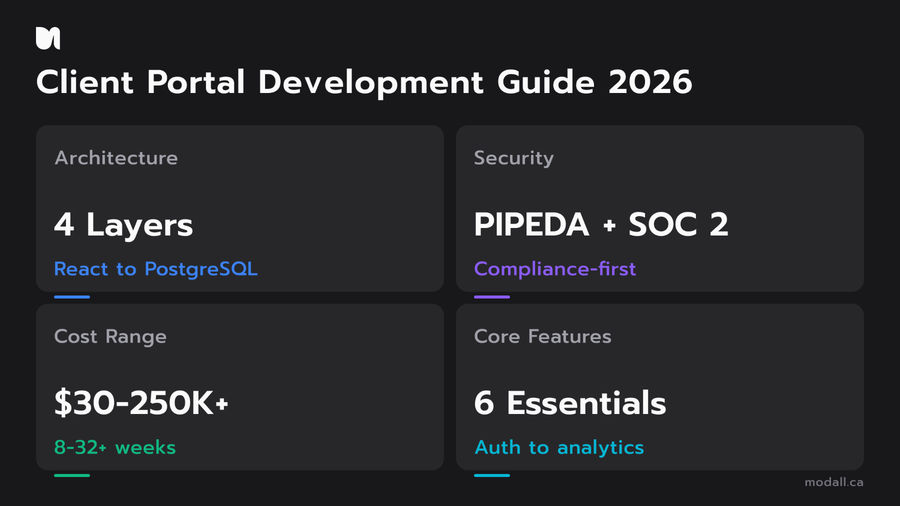
Enterprise | SSO, compliance (SOC 2/PIPEDA), custom workflows, API layer, audit logging | 20 to 32+ weeks | $120,000 to $250,000+ |
These ranges reflect the Canadian development market and assume a team of 2 to 4 developers working in agile sprints. The SaaS development cost guide for Canada provides additional context on how software pricing works in the Canadian market.

Several factors push costs toward the higher end of each range. Third-party integrations add complexity; connecting to an ERP like SAP or NetSuite requires significantly more work than integrating with Stripe for payments. Custom reporting dashboards with charts, filters, and export functionality take more design and development time than simple status pages. Compliance requirements (SOC 2, HIPAA, PIPEDA) add security architecture, audit logging, and documentation overhead that are not optional when serving regulated industries.
On the other side, costs stay lower when you can use a proven tech stack with well-supported libraries, phase the build so you launch with core features first and add complexity in later sprints, and start with a structured discovery phase that eliminates scope ambiguity before development begins.
The biggest cost risk in portal projects is scope creep. A portal that starts as "just a place to share files" often grows to include messaging, billing, analytics, and custom workflows mid-build. Starting with a discovery phase that documents every feature and integration before code is written prevents this. If you are earlier in your product journey and trying to validate the portal concept first, our guide on MVP development for startups explains how to launch with a focused feature set and expand based on real user feedback.
How We Build Client Portals at Modall
At Modall, we are a custom software development company based in Ontario, Canada, founded in 2019. Our team builds client portals on the same stack we use across all our web application projects: TypeScript, React, Next.js, Tailwind CSS on the frontend, with Node.js, Prisma, and PostgreSQL on the backend.
We have built portal-like authenticated experiences across multiple client projects, from multi-tenant ERP dashboards for PizzaForno to client-facing financial platforms for New Market Trading. The pattern is consistent: define the data model, lock down authentication and permissions first, then build the user-facing features on a secure foundation.
Our process starts with a paid Discovery phase where we scope every feature, integration, and user flow before writing any code. This prevents the scope creep that derails most portal projects and gives you a fixed-price development estimate based on real requirements, not assumptions.
From there, we work in sprint-based development cycles, typically 2 to 4 weeks per sprint, with deployable builds at the end of each cycle. You see working software, not slide decks.
Every portal we build ships with authentication, RBAC, and encrypted data storage as baseline features. Compliance requirements like PIPEDA or SOC 2 are addressed at the architecture level during Discovery, not bolted on as an afterthought.
If you are planning a client portal and want to understand the scope and investment involved, book a free consultation and we will walk you through how the Discovery process works.
Frequently Asked Questions
How much does client portal development cost?
Custom client portal development typically costs between $30,000 and $250,000+ depending on complexity. A basic portal with login, document sharing, and a status dashboard runs $30,000 to $60,000. Mid-range portals with CRM integrations, role-based permissions, and automated notifications fall in the $60,000 to $120,000 range. Enterprise portals with SSO, compliance frameworks, and custom workflows exceed $120,000. These ranges reflect Canadian development rates and assume a team of 2 to 4 developers.
What features should a client portal include?
Every client portal needs secure authentication, role-based access control, document management, and a project status dashboard at minimum. Beyond the basics, most B2B portals benefit from in-portal messaging, invoice and payment integration, automated notifications, and reporting dashboards. Enterprise portals add SSO, audit logging, compliance documentation, and custom API layers. Prioritize the features that solve your biggest client communication pain points first, then expand in phases.
Should I build a custom portal or use off-the-shelf software?
Off-the-shelf tools like Softr, Knack, or Moxo work well for simple document sharing or project status portals with fewer than 50 users and no compliance requirements. Custom development is the better path when you need complex integrations with existing systems (ERP, CRM, billing), granular role-based permissions, compliance with SOC 2 or PIPEDA, or the ability to scale to hundreds of users without per-seat pricing compounding your costs.
What is the best tech stack for building a client portal?
The most proven stack for custom client portals in 2026 is TypeScript across the full stack, with React and Next.js on the frontend and Node.js with PostgreSQL on the backend. Next.js provides server-side rendering for fast page loads, TypeScript catches bugs at compile time rather than in production, and PostgreSQL handles the complex queries and transactional data that portals require. At Modall, this is the exact stack we use for every portal and web application project we deliver.
How long does it take to build a custom client portal?
A basic client portal takes 8 to 12 weeks to build, from Discovery through launch. Mid-range portals with integrations and compliance features run 12 to 20 weeks. Enterprise-grade portals with SSO, audit logging, and complex workflows require 20 to 32+ weeks. These timelines assume a discovery phase at the front end to define scope clearly. Skipping discovery is the most common cause of delayed portal projects, because undefined scope leads to mid-build changes that push timelines and budgets.
Do I need SOC 2 compliance for my client portal?
If you serve enterprise clients or handle sensitive financial, health, or legal data, yes. SOC 2 is increasingly a contractual requirement in B2B relationships, not a nice-to-have. The SOC 2 framework covers security, availability, confidentiality, processing integrity, and privacy. Most enterprise procurement teams require a Type 2 report that demonstrates effective controls over 12 months. Building SOC 2 readiness into your portal architecture from the start costs significantly less than retrofitting it later.
Your Client Portal Is a Competitive Advantage Worth Building Right
Client portal development is an investment that pays for itself through reduced support costs, higher client satisfaction, and a professional experience that sets your business apart. The companies getting this right are not using generic templates; they are building portals that reflect their workflows, meet their compliance needs, and scale with their client base.
At Modall, we have built authenticated, data-driven platforms for organizations across industries, and every one of them started with a clear scope and a solid technical foundation. If you are ready to build a client portal that works the way your business does, get a free quote and let's scope it together.